 TabMinder
Close the tab.
We'll bring it back.
TabMinder reminds you about any web page at exactly the right time. Pick a time in one click, add a note, and stop keeping 40 tabs open "just in case".
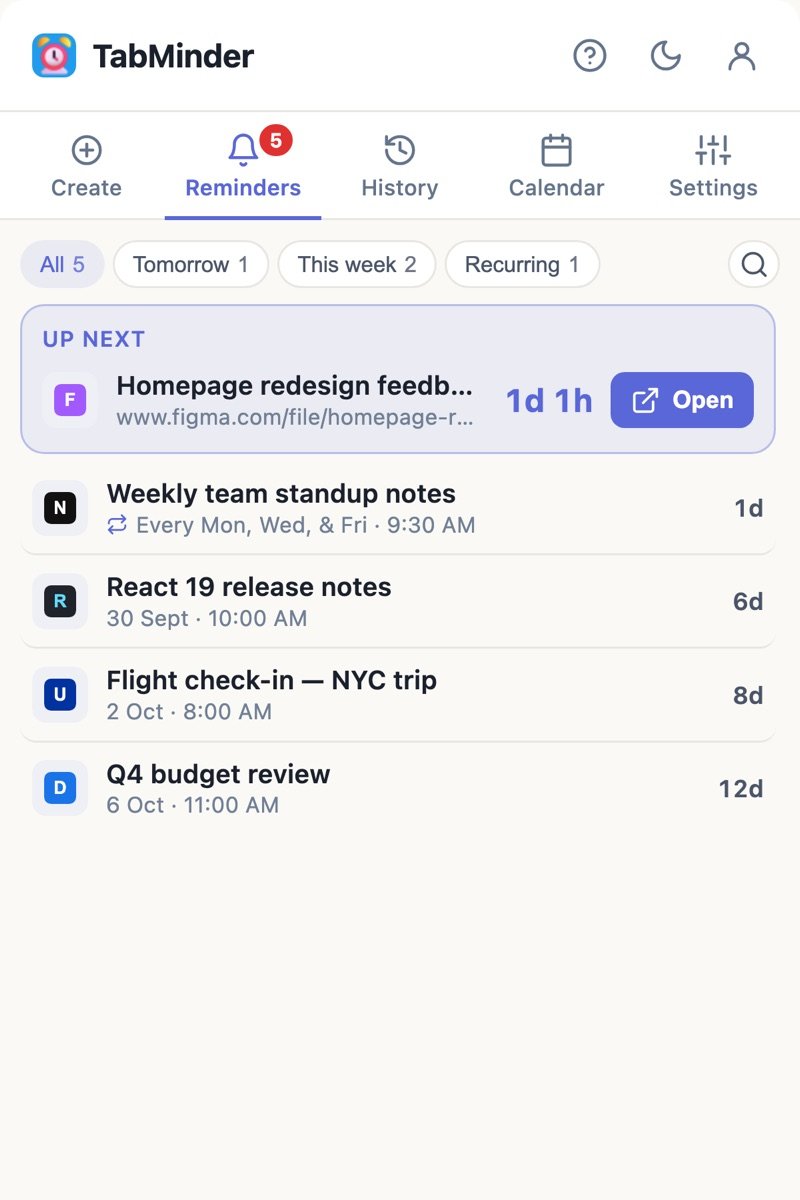
Everything you need to stop losing tabs
Small, fast and focused. TabMinder does one job, reminding you about pages, and does it really well.
One-click quick times
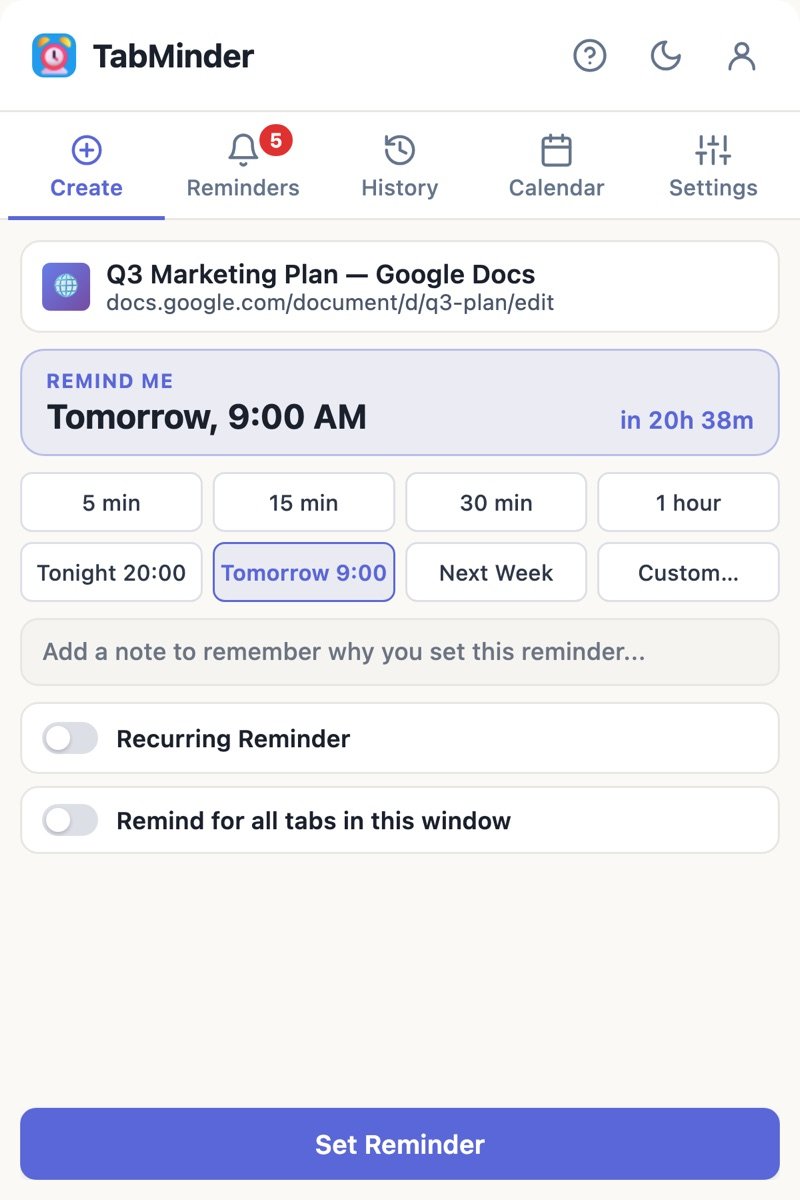
5 min, 15 min, 30 min, 1 hour, Tonight, Tomorrow 9:00, Next week, or any custom date and time. Change the quick times to suit you.
Recurring reminders
Daily, weekdays, weekends, weekly, monthly or yearly, or pick exact days like Mon, Wed and Fri. Add an end date if you need one.
Notes that explain why
Add a quick note so future-you knows exactly why the page mattered. It shows up in the list and the notification.
Whole-window reminders
Researching something? Save every tab in the window with one reminder and pick the work back up later.
Notifications you can act on
Open the tab or snooze it right from the notification. Pick from five sounds and set the volume, or keep it silent.
Never misses a reminder
If Chrome was closed when a reminder was due, it shows the moment you open Chrome again. Repeating reminders schedule the next one on their own.
Calendar view
See your whole month at a glance, with colored dots for upcoming, recurring and completed reminders. Export a month in one click.
History with a timeline
See when each reminder was set, when it was due and when you acted on it. Bring any page back with "Remind again".
Keyboard shortcuts
Press Alt+Shift+R on any page for an instant reminder, or Alt+T to open TabMinder.
Light, dark and your color
Light, dark or automatic theme, plus nine accent colors, so TabMinder looks right in your browser.
Speaks your language
English, Deutsch, Español, Français, हिन्दी, Bahasa Indonesia, 日本語, Português, Русский and 中文.
Cloud backup Pro
Sign in with just your email and your reminders are backed up. Moving to a new computer? Sign in and they come right back.
Simple enough to use in two seconds
Click a step to see the real extension.

Three steps. That's it.
Add TabMinder to Chrome
Install it from the Chrome Web Store and pin the alarm-clock icon to your toolbar.
Pick a time on any page
Click the icon (or press Alt+Shift+R), choose a quick time, add a note if you like, and close the tab.
Get reminded, right on time
A notification appears when it's due. Click it to go straight back to the page, or snooze it for later.
Try every feature free for 21 days
No credit card, no password. When you're ready, one simple plan with everything included.
No account needed.
14 more days of Pro.
to keep creating reminders.
Pro Monthly
- Unlimited reminders
- Recurring and whole-window reminders
- Your own quick times and snooze length
- Cloud backup and restore
- Export your data anytime
Pro Yearly
- Everything in Monthly
- Half the price of paying monthly
- One payment a year, no surprises
- Cloud backup and restore
- Export your data anytime
Your tabs are your business
TabMinder is built to know as little about you as possible.
Stays on your device
Reminders and history live in your browser. They're only backed up if you sign in to Pro.
Never reads your pages
TabMinder only sees the title and address of tabs you choose to be reminded about. It never reads or changes page content.
No passwords
Sign in with a one-time code sent to your email. There's no password to remember, reuse or leak.
No ads, no selling
We don't show ads, track you across sites, or sell your data. Ever. Read the privacy policy.
Questions, answered
Is TabMinder free?
You get every Pro feature free for up to 21 days: 7 days straight after installing, with no account, and 14 more days when you add your email. After that, Pro is $3.99 a month or $24 a year. Reminders you've already set keep working even if you don't upgrade.
Do I need an account?
Not for the first 7 days. After that you add your email to continue. There's no password: you sign in with a 6-digit code we email you.
I paid. How do I unlock Pro?
Your license key arrives in the Payhip receipt email. In TabMinder, sign in, open Account → Manage Subscription → Have a license key?, paste the key and click Activate. Can't find the key? Email us with your order email and we'll help.
What happens if Chrome is closed when a reminder is due?
Chrome can't show notifications while it's fully closed, so TabMinder shows any reminders you missed as soon as you open Chrome again. Nothing gets lost.
Can I cancel my subscription?
Yes, anytime. You keep Pro until the end of the period you've paid for. See our refund policy for details.
How do I move TabMinder to a new computer?
With Pro, your reminders, history and settings are backed up to your account. Install TabMinder on the new computer, sign in with the same email, and everything comes back.
What does TabMinder collect?
Only what it needs to work. Reminders stay in your browser unless you sign in to Pro, in which case they're backed up to your account. We never read page content or track your browsing. The privacy policy lists every detail.
Which browsers are supported?
TabMinder is built for Google Chrome on Windows, Mac, Linux and ChromeOS.
We read every message
Questions, ideas or a bug to report? Send us a note and we'll get back to you.
Close a tab today. Get it back tomorrow.
Join people who've stopped hoarding tabs. Free for 21 days, no card needed.
Add TabMinder to Chrome